Introducing the MemryX eXamples Launcher
A browser-based front door to MemryX eXamples.
A great examples repository is useful—until the first question becomes: where do I start?
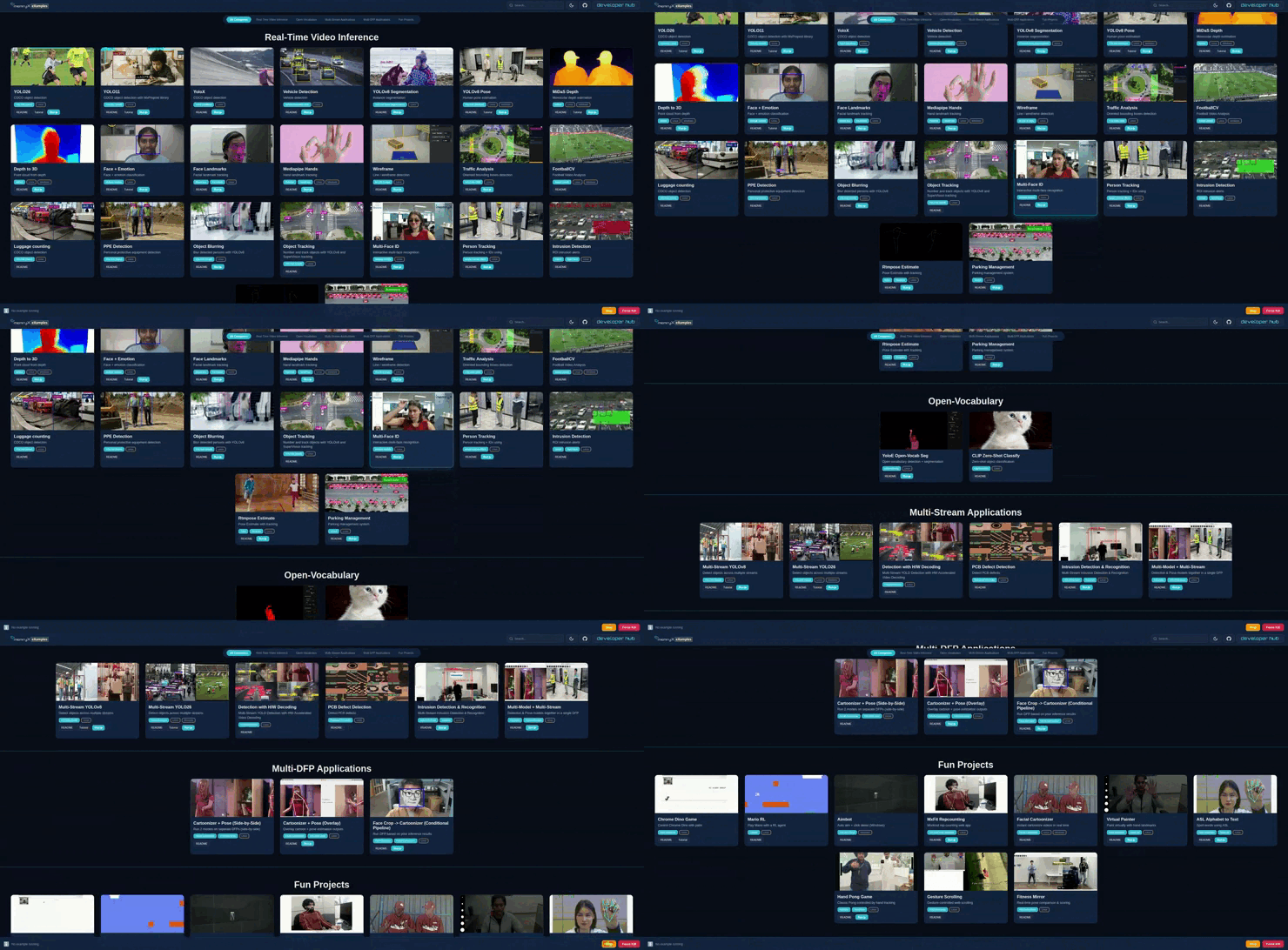
MemryX eXamples already covers a wide range of workflows, from real-time video inference to open-vocabulary, multi-stream, and multi-DFP demos. That breadth is valuable, but it can also create friction for new users. Even with good READMEs, getting started often means opening the repository, scanning categories, jumping between docs, figuring out which demos are runnable, and then switching back to the terminal to launch everything by hand.
The new MemryX eXamples Launcher is designed to make that first-run experience much simpler.
One dashboard, less friction
Instead of treating the examples repository like a directory tree you have to navigate manually, the launcher turns it into a local browser-based experience. You open one interface, browse examples by category, search across the catalog, jump straight to the README or tutorial for an application, and launch supported demos with a click. While an example is running, the launcher keeps status visible and gives you simple controls to stop or force-kill the process when needed.
That may sound like a small change, but in practice it meaningfully improves the experience.
The value of an examples repository is not just the code it contains. It is how quickly a developer can go from “this looks interesting” to “this is running on my machine.” The GUI launcher shortens that path. It gives MemryX users a front door into the repository instead of asking them to memorize folder names, terminal commands, and per-example entry points before they can even try something.
Built on top of the repo, not beside it
What makes the launcher especially effective is that it does not replace the repository. It builds on top of it.
The current implementation reads the existing MemryX eXamples structure, organizes categories into a dashboard, and surfaces the same docs and tutorial links users would otherwise open manually. Under the hood, it can also generate runnable run.sh wrappers from an example’s README when a dedicated launcher script does not already exist. On startup, it runs as a local Flask app, serves the interface on http://localhost:8080, and streams live status back to the browser. The frontend adds practical touches like search, dark mode, and persistent run controls.
From discovery to first run
On startup, the launcher runs locally, opens in your browser, and gives you a single place to explore the examples catalog. From there, the workflow is simple: choose an example, review the docs if needed, click Run, and monitor status in the same interface.
It also keeps practical quality-of-life features close at hand, including search, category navigation, live status visibility, and simple run controls.
The result feels less like “open a repo and figure it out” and more like “choose a demo and start exploring.”
Getting started
Getting started is straightforward: create a Python virtual environment, install the launcher from the MemryX eXamples release flow, run example_launcher, and open it locally in your browser. Then choose an example, click Run, watch the status, and iterate.
The bigger point is this: great developer experience is not only about compiler support, model coverage, or raw performance. It is also about how quickly someone can discover a capability and see it working. The MemryX eXamples Launcher helps close that gap. It turns a growing repository of examples into something easier to browse, easier to understand, and much faster to try.
Because the best demo is not the one buried three folders deep, it is the one you can run right away.