How accurate should you be?
“All models are wrong, but some are useful.” — George Box

The foundation of any AI system is the model powering it. It is arguably one of the most consequential decisions you make. A major factor in that decision is the “accuracy” of the model. In this blog post, we will examine accuracy from a practical standpoint. The discussion is intentionally kept high-level and focuses more on intuition than formal definitions.
What is accuracy?
You will find this metric used in simple applications like image classification. For example, the classic MNIST dataset is a collection of handwritten digits. The goal is to predict a number from 0 through 9 given one of these images. The performance of a model here is measured with accuracy, i.e., what percentage of images are correctly classified.
Unfortunately, this intuitive idea does not always apply, or is not always useful. For example, suppose we have a dataset like MNIST, but 90% of the images are handwritten “1”s. A model that always predicts the image is a “1,” without even looking at the image, would have an accuracy of 90%.
In Practice
Accuracy is often used as a general or umbrella term for “model correctness,” even if the metrics we are interested in do not include accuracy. You may have seen the following metrics thrown around:
- Precision — measures trust in your positive predictions.
- Recall — measures how completely the model captures the positive cases.
- F1 score — balances precision and recall.
- ...and many, many more.
It is an interesting exercise to think about what these metrics would be in the case presented in the previous section. Keep in mind that these metrics apply per class. That is, when thinking about “1”s, replace “positive” with “1” in the descriptions above.
The point is, all these metrics and more may be informally grouped together as the "accuracy" of the model.
Example
"Give me the most accurate cancer detection model ever!"
Most people tested do not have cancer, especially in preventive screening, so a model that predicts that no one has cancer would be quite accurate. If only 0.1% of those tested had cancer, this model would be 99.9% accurate!
Cancer can be very deadly, so we want to make sure that if a person has cancer, we do not miss it. This maps directly onto the description of recall above.
However, a model that predicts everyone has cancer would have a recall of 100%. We do not want to hand everyone tested a cancer diagnosis for obvious reasons. The precision of this model, on the other hand, would be quite low: 0.1%, since its positive predictions are not trustworthy.
So while the task here was to get the “most accurate” model, an AI scientist or engineer would likely interpret it as: “they want a model with a high F1 score,” since this metric balances both precision and recall.
For simplicity, we have omitted discussions of PR curves, ROC curves, AUC, etc., and leave those as further reading.
What affects accuracy?
The model architecture, the training algorithm, the dataset, the metrics, the honesty of the engineer, and much, much more can all affect accuracy. This discussion will be much more limited in scope.
We will assume you have already picked a model based on appropriate metrics and now want to deploy it. The factors below are not comprehensive, but rather reflect what we have observed in practice. Going forward, when you read “accuracy,” think “model correctness metrics.”

Fine-Tuning
Suppose you are making an object detection application. If this application is meant to detect people, you are in luck. You can use a pretrained model such as YOLO from Ultralytics, which has already been trained to detect people. You could then further fine-tune it on people specifically, omitting the 79 other irrelevant classes, to boost accuracy for your use case.
If, however, you wanted to detect nuts and bolts, you would have two primary options. You could make a custom model and train it from scratch on a nuts-and-bolts dataset. Or, more practically, you could do the same thing as before by taking a pretrained YOLO model and fine-tuning it on your new nuts-and-bolts dataset.
Either way, fine-tuning your model to your exact use case is a great way to boost accuracy. Once the model is accurate enough for the task, the next challenge is often making it efficient enough to deploy.
Model Compression
This encompasses various techniques such as quantization, pruning, and distillation. All these techniques try to make the model “smaller” while minimizing accuracy loss.
The most commonly used technique is quantization, where weights and activations are represented with reduced precision, for example, INT4 instead of FP32. More values can fit in the same memory footprint because each value is smaller, but accuracy may be lost due to reduced numerical precision. Quantization is also often followed by a calibration stage, and in some cases additional fine-tuning, to reduce this loss.
Pruning is a technique where the least important weights or neurons of a network are removed, thereby altering its architecture. Distillation attempts to train a smaller model to mimic a larger model.
All these techniques can reduce accuracy, so they are commonly used when efficiency, memory, latency, or power consumption are major constraints.
Input Quality
If the inputs the model sees during training do not match what it sees in deployment, it will likely perform poorly. Dataset selection is key here, and very often a custom dataset needs to be created. While labor-intensive, this is one of the best ways to boost accuracy, as the model learns exactly what you need it to do.
Input resolution is also a key factor. In many computer vision applications, images are intentionally downsized, as operating on 4K or FHD images or videos can be too computationally intensive. The YOLO series of models, for example, is commonly trained and evaluated at 640×640 resolution. Downsizing images causes information loss, which can hurt accuracy, particularly if the model was trained on a different image resolution.
How Much Accuracy Does MemryX Preserve?
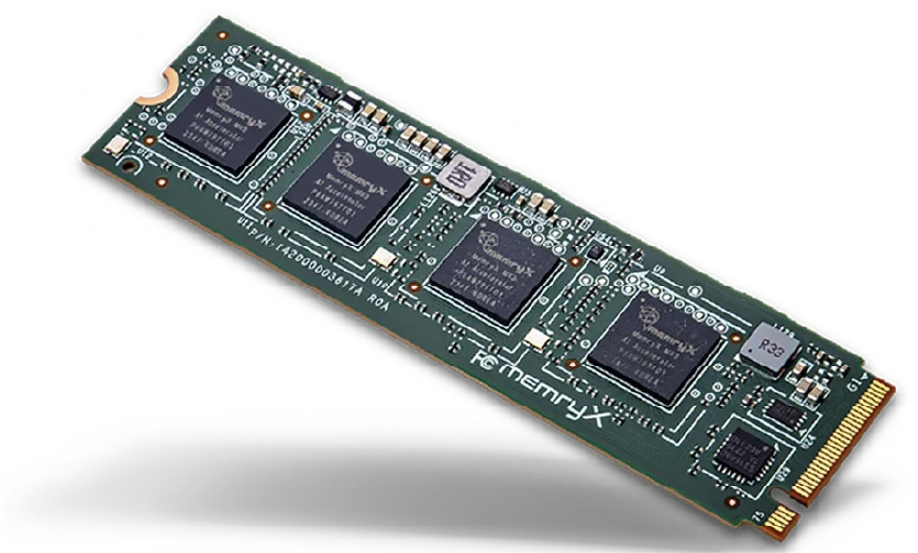
The following numbers were generated by evaluating YOLO26n on the COCO validation dataset on MemryX MX3 hardware and an RTX 4090 GPU. There were no modifications made to YOLO26n when running on MX3, and the evaluation script was identical for both. You can see a simplified version of our evaluation procedure in our YOLOV8 Accuracy Evaluation Tutorial.
| Metric | MemryX MX3 | RTX 4090 |
|---|---|---|
| mAP@0.50:0.95 | 0.394 | 0.401 |
| mAP@0.50 | 0.554 | 0.557 |
| mAP@0.75 | 0.428 | 0.435 |
| AP Small | 0.194 | 0.198 |
| AP Medium | 0.430 | 0.441 |
| AP Large | 0.572 | 0.582 |
| AR@100 | 0.605 | 0.612 |
The primary “accuracy” metric in object detection is Bounding Box Mean Average Precision, or mAP, measured at Intersection over Union (IoU) thresholds from 0.50, which is loose, to 0.95, which is strict, in increments of 0.05. We will skip the full definition, but this number is shown in the first row of the table. In other words, MX3 preserves the model’s accuracy closely while enabling deployment on dedicated edge AI hardware.

You will notice minimal drops in accuracy, i.e., average precision and average recall, when running on our hardware. These small differences are due to hardware differences and precision loss from the custom number formats used in MX3. The tradeoff for this small accuracy loss is the speed and performance achieved on our chips. To learn more about what makes our hardware special, check out our Architecture Overview.
Our Neural Compiler has various features that can be enabled to help maximize accuracy, such as High Precision Output Channels, Auto Double Precision, and Per-Layer Weight Quantization. The MemryX DevHub has documentation and tutorials on these features.
As part of our software release cycle, we evaluate hundreds of models to ensure accuracy remains on par with the reference implementation.
So, How Accurate Should You Be?
As you might have guessed, it depends. Here are the things you should consider:
- Define the metrics you want to optimize for and their thresholds. An mAP@0.50:0.95 of 40%, as shown above, may seem low, but it is quite capable. On the other hand, an accuracy score, meaning the ratio of correct predictions, of 40% is quite bad. So be sure to understand what your chosen metrics actually represent.
- Tune the thresholds to your application. Different applications prioritize different metrics and thresholds, as illustrated above. If you are making a cancer detector, you really do not want to miss a positive case. On the other hand, if you are counting cars from a traffic camera, missing a car partially covered by a bus may not be the end of the world. The lower the requirements of your application, the more leeway you have with the other decisions here.
- Select the appropriate hardware. This decision will control which models you can use, as well as the cost and scale of your deployment. While a datacenter-grade H100 GPU can run a wide range of models, it is expensive, power-hungry, and will not fit into most edge deployments. So it may be wiser to use a specialized AI accelerator, TPU, NPU, or similar hardware.
- Find or train the model you want to use. You will likely want to use the model that performs best on the metrics you have picked and also runs efficiently on the hardware you selected. For example, if you wanted to deploy an object detector to a network of CCTV cameras at the edge, you probably could not run a model like YOLO26 x-large on them. Compromising with YOLO26 nano or small would be wise.
Conclusion
We hope this article has given you a practical sense of the key considerations involved in building and deploying an AI application. As with any interesting engineering problem, accuracy is not a single number to maximize blindly. It depends on the task, the metric, the data, the model, and the deployment constraints.
Whether you are tinkering at home or developing a large-scale deployment, making these decisions intentionally will help you choose the right model, the right metrics, and the right hardware for your application.